Key Highlights
The world of technology moves quickly, and to keep up, you need to learn and use the latest changes and methods. Many companies now use cloud-native tools, so there is a higher need for managed IT services that make the most of platforms like Docker and Kubernetes. Things change fast, and in 2026, it is important to know how all these new technologies and microservices work together. If your group wants to get the best from its IT setup, this matters.
In this blog, you will read about how managed IT services have changed over time. You will also see which new ideas and benefits come with Kubernetes-based solutions. We will talk about what managed IT providers must know and which top companies are leading in these areas. By the end, you will know more about ways to use containers and get the most out of modern, cloud-managed IT features, which will help your company get ahead. Let’s get started!
Introduction
With managed services, you do not have to set up or take care of the back-end cloud parts yourself. This means you have more time for your apps and do not need to worry about the background work.
How do these managed IT services help you grow? They take care of putting your apps in place, growing them, and keeping them working well. With Kubernetes, they can handle these tasks automatically so your apps keep running without problems.
When you look at the top tools for managing containers in 2025, managed IT services often talk about Kubernetes and tools like Docker Swarm, Rancher, Amazon ECS, and Google Kubernetes Engine (GKE). A lot of people like these tools because they work well, help you keep up with growth, and connect smoothly with the cloud systems you already use.
Evolution of Managed IT Services with Kubernetes in 2026
The job of managed IT services has changed a lot since Kubernetes became popular. Regular IT support used to be mostly about taking care of basic infrastructure. By 2026, managed Kubernetes services are very focused. They will handle the whole process of containerized apps in a microservices setup. This is now a big part of today’s digital change.
Major cloud companies now offer services that manage the tricky parts of container orchestration. Amazon Web Services (AWS), Google Cloud Platform, and Microsoft Azure are top names in managed IT services for Kubernetes and microservices in 2025. They all give strong, business-level choices for Kubernetes management. Because of these changes, your team can pass off tough daily jobs and get to use cloud-native tech better. You do not need a special team of Kubernetes experts. You also get to build new things fast and make the most out of the cloud.
Pivotal Trends Transforming Managed IT Services
One big change now is that there is a lot of focus on helping your developers work better. Managed services help with this. They hide the hard parts of the setup. Your developers do not need to worry about how Kubernetes works underneath. This makes it much faster and easier for them to launch apps. As a result, the steps from building code to using it live are much quicker and simpler.
Another big change is the use of machines to do important jobs that help your systems run well. Managed providers do things like letting your app grow as more people use it and spreading work out so all users get a good speed. With this help, your services stay easy for people to reach, with no extra work from you. This makes your system keep working and customers stay happy.
These trends help make your team’s work better. When you let someone else handle cluster management, security updates, and monitoring, your engineers spend less time on small fixes. This means they can use more of their time to build new features and help the business grow. At the same time, the managed service provider makes sure the platform works well and is steady.
Adoption of Kubernetes in Modern Enterprises
Modern companies are moving fast to use managed Kubernetes. They do this to get through the hard parts of handling many containers at once. Making and keeping up a Kubernetes group on your own takes a lot of time, work, and know-how. That is why many groups pick managed choices. These can take care of the hard stuff for you.
Services like Google Kubernetes Engine (GKE), Amazon Elastic Kubernetes Service (EKS), and Azure Kubernetes Service (AKS) are now popular. These platforms are from major cloud providers. They work well with a lot of other AWS services and many cloud tools. This gives development teams a smooth, connected way to work.
By choosing these managed services, businesses can set up the apps they need in a safe way. They don’t get stuck worrying about cluster setup, updates, or staying safe. This helps them use the advantages of Kubernetes to build their microservices. They can put more time into their main goals. This also helps them move faster with new ideas and get things running sooner.
Integration of Docker, Microservices, and Cloud-Native Technologies
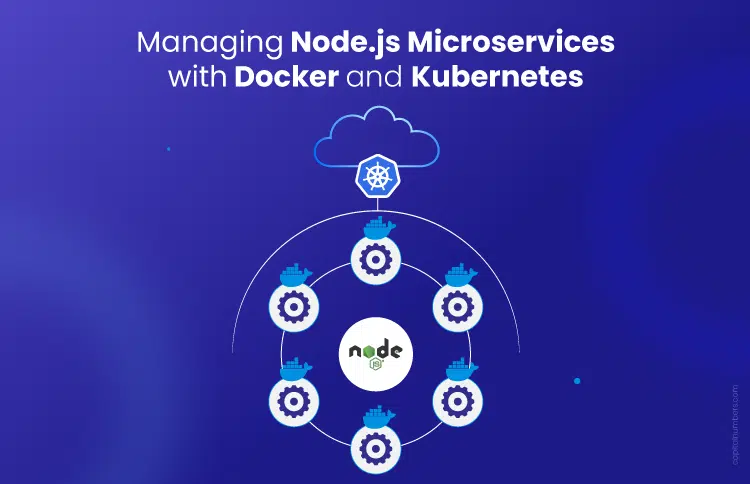
Managed IT providers specialize in seamlessly integrating Docker, microservices, and cloud-native technologies into a unified, high-performing ecosystem. By leveraging Docker containerization technology, organizations can package applications and their dependencies into lightweight, portable containers that run consistently across environments. These containers are then orchestrated using Kubernetes to monitor, manage, and scale workloads efficiently.
Within a microservices architecture, applications are divided into smaller, independently deployable services. Managed Kubernetes services simplify this environment by handling critical operational functions such as service discovery, secure inter-service communication, traffic distribution, and automated scaling. This ensures that each microservice interacts securely and performs reliably within the broader infrastructure.
This intelligent automation layer empowers development teams to deploy updates and roll out new features without disrupting the entire application. Meanwhile, the managed IT provider oversees the underlying cloud infrastructure, enabling businesses to benefit from a modern, scalable, and resilient architecture—without the operational complexity.
Key Benefits of Kubernetes-Driven Managed IT Services
Using managed Kubernetes services gives your business a lot of value. It helps you keep things simple. A big benefit is that you get high uptime and can grow often with little money spent on hardware or staff. This means customers get better and more stable help from you.
Also, these services help you save money because you only pay for what you use. Tools like automatic scaling stop you from buying more than you need, so you don’t pay for unused space. With this mix of reliability, good use of resources, and lower costs, you can put your attention on your apps. The next parts will look at these good points more closely.
Maximizing Scalability and Availability
Managed IT services help your apps deal with changing demand with ease. They use the public cloud to let your systems scale automatically. Your Kubernetes clusters can go up or down as needed for live traffic. You do not need to do this by hand. This helps prevent your apps from slowing down when the traffic is high.
High availability is another important feature. Managed providers give strong Service Level Agreements (SLAs). These usually promise 99.95% uptime. They do this by spreading your apps over different availability zones. They also handle the main infrastructure. You do not have to be concerned about one thing failing.
This way helps your application stay easy to use for all. It also lets you get the most out of what you have. Some key things that help with this are:
- Automatic Scaling: Acts fast when traffic goes up. It adds or removes space as needed.
- Automated Load Balancing: Spreads new traffic the same way over your containers. This keeps them from getting too busy.
- Smart Resource Use: Places containers where space in nodes is open. This helps not waste the things you have.
- Node Auto-Repair: Spots broken parts on its own and swaps them. This keeps the cluster healthy.
Enhanced Security and Compliance Measures
Security remains a critical priority in any cloud-native environment, especially when managing distributed containerized workloads. Managed Kubernetes services incorporate advanced security controls to safeguard applications across clusters and environments. Service providers implement strict access policies, role-based access control (RBAC), secrets management, vulnerability scanning, and continuous monitoring to reduce risk exposure. This significantly lowers the operational burden of securing multiple containers and microservices while maintaining enterprise-grade protection.
Leading managed service providers also align with globally recognized industry standards and frameworks, including guidance from the Cloud Native Computing Foundation (CNCF). CNCF-backed best practices ensure Kubernetes deployments follow secure configuration models, compliance benchmarks, and cloud-native governance principles. With this structured security approach, organizations can build a resilient and compliant infrastructure—without needing deep in-house container security expertise.
Providers use a few ways to keep your deployments safe. These ways often include:
- Integrated RBAC: Role-Based Access is used here. It helps manage what users can do and makes sure only the right people can get in to important resources.
- Automatic Security Patching: The provider takes care of security updates for the main system and workers.
- Audit Trails: A single logging and tracking system gives you a complete record of every action. This is helpful when there are checks to be done for rules or laws.
- Built-in Security Tooling: A lot of platforms come with safety scanning and certificate control built in.
Accelerated Deployment and Reduced Downtime
One big plus of managed IT services is how they can help you speed up your software delivery. These services take care of cluster management for you. This lets your developers focus on code and send out updates more often. It helps you launch new features at a faster rate.
These platforms often come with built-in deployment (CD) pipelines. They also work well with other CI/CD tools. This helps to build, test, and release your applications using automation. It is important because it cuts down on mistakes you may make by hand, and you can finish release cycles faster.
Automated processes help to cut down on time when systems may not work. Managed services use these tools to fix things quickly.
- Automated Upgrades and Rollbacks: Make it easy to update your apps, and quickly go back to the old one if you see a problem.
- Managed Control Plane: The provider keeps the Kubernetes control part up and running, so there are no large outages in the cluster.
- Proactive Monitoring: The provider often finds and fixes problems before they reach your users.
- Canary Deployments: Some services let you split traffic, so you test new stuff with a few users before you show it to all.
Essential Expertise for Managed IT Providers Supporting Kubernetes and Microservices
When you want to pick a managed IT partner for your Kubernetes and microservices projects, you have to make sure that their skills matter most. You need to get someone who knows a lot, not just about Kubernetes, but also about everything in the cloud-native world. It is good to look for a company that has many years in the field. Be sure they can show you and others they have done well in handling jobs like these before.
The team needs to know about containerization, how APIs work, and the latest DevOps practices. With these skills, they can do more than simple tasks. They can be a helpful partner and make your system and the way you work better. Now, let’s look at what skills matter most.
Skills in Docker, Kubernetes, and API Management
A leading managed service provider should have deep knowledge of Docker. The team needs to know the best ways to make secure and fast Docker containers. These containers are the base of your whole app. They should help you create small images that work well for use in the real world.
It is very important to know how to use the Kubernetes service well. The job is not just to start up a group of computers. You need to know about the way they talk to each other, where their files go, how things are lined up, and how to keep them safe. All of this should fit your needs. A person needs to fix problems and make the cluster run better.
In the end, good skills in API management are very important, mainly when you use a microservices setup. Here, the different services use APIs to talk to each other. A good provider will help set up and run API gateways to keep the system safe, manage traffic, and watch how things are working.
- Containerization: Skilled in making applications work inside Docker containers.
- Orchestration: Good at using Kubernetes to set up, grow, and run things.
- API Management: Can keep microservices safe and working together.
- Ecosystem Integration: Know about the wider cloud-native tools that connect everything.
Proficiency in Infrastructure as Code (IaC)
Using Infrastructure as Code (IaC) helps you handle cloud services and Kubernetes setups in a smooth way. This practice lets your team put resources in place and set them up by using code. It makes developers do their work faster and helps things run well. When you write your infrastructure as code, the company can be sure their systems are always up and stay the same every time, which is so important for microservices.
Tools like Terraform or CloudFormation let DevOps teams work together better. They make it easy to join with CI/CD processes and stay close with what the industry expects. This way helps teams grow as needed and also helps everyone get better at what they do over time.
Advanced DevOps and GitOps Practices
Adopting advanced DevOps and GitOps methodologies enables development and operations teams to collaborate more effectively while accelerating software delivery cycles. Through automation, continuous integration, and continuous deployment (CI/CD), organizations can release high-quality software faster while aligning closely with evolving business and customer requirements. Industry research, including the State of DevOps Report, consistently highlights how high-performing DevOps teams achieve greater deployment frequency, improved reliability, and reduced failure rates.
By implementing Infrastructure as Code (IaC), teams standardize and version-control their environments, ensuring consistency across development, staging, and production systems. Combined with Docker and Kubernetes, this approach simplifies the management of containerized workloads, enabling scalable, resilient, and repeatable deployments across complex environments.
These modern practices optimize resource utilization, strengthen security governance through automated policy enforcement, and reduce operational overhead. Ultimately, organizations benefit from improved efficiency, lower costs, and faster innovation cycles.
Leading Managed IT Service Companies in the United States (2026)
When you look for a partner in the United States, you should check for service providers that have done well with Kubernetes before. The top companies know a lot about the field. They work hard to follow best ways to do things and help you as you go. This makes sure that moving to container-based apps is easy and works well for you.
These companies include big cloud vendors with their own managed Kubernetes services. There are also other firms that let you use more than one cloud. Each one brings its own group of tools and skills for different business needs. The next parts will help you see how to pick a provider and who the big names are.
Selection Criteria for Top Providers
To pick the right provider, you need to look at what your team needs and what your app is for. Do not just go with the biggest name out there. Find one that fits your group well. First, check their experience with Kubernetes and microservices. See if they have a good history too.
Next, think about how well what they offer fits with your plan for the cloud. If you use just one cloud, it may be good to choose a tool made for that cloud, like GKE or EKS. But if you want to switch between clouds and not get stuck with one, it may be better to pick a platform that works on many clouds.
At the end, it is good to balance how much control you have and how easy things feel. To choose the best partner, think about these things:
- Team Expertise: Does the platform make things easier for teams that are new to Kubernetes, or do you need people who already know a lot about it?
- Total Cost: Look at what you will pay to use the platform, how much it costs to run your system, and how much time your engineers will need to spend taking care of it.
- Industry Standards: Check that the provider has CNCF certification and that their Kubernetes also works well with other tools.
- Integration: Make sure the service fits with the tools you already use for CI/CD, monitoring, and security.
Overview of Prominent Managed Kubernetes Service Providers
The market for managed Kubernetes is run by the big cloud companies. There are also some platforms that give good options for people who need something different. Google Cloud uses Google Kubernetes Engine (GKE), and it is strong in this area. Google created Kubernetes first, so it has a lot of experience with it. Amazon EKS and Azure Kubernetes Service (AKS) are very good too. If you use AWS or Microsoft Azure a lot, these are the best choices for you.
Beyond the big three, providers like DigitalOcean Kubernetes (DOKS) are good for their simple setup and clear pricing. This makes them a good choice for startups and teams that do not want things to get too complex. These services take care of the main management parts and give you easy cluster controls. You can focus on your apps without getting stuck in other work.
Every provider gives you something different. They each have their own mix of features, price, and how hard it is to use. You can see a list below that shows some of the top choices at a glance.
| Provider | Key Strengths | Best For |
| Google Kubernetes Engine (GKE) | Advanced networking, Autopilot mode, deep integration with Google Cloud. | Organizations using GCP and needing powerful configuration options. |
| Amazon EKS | Deep integration with AWS services, multiple deployment options (EC2, Fargate). | Companies standardized on AWS, requiring hybrid or on-premise solutions. |
| Azure Kubernetes Service (AKS) | Strong integration with Azure DevOps, serverless container options, user-friendly dashboards. | Teams using the Microsoft Azure ecosystem. |
| DigitalOcean Kubernetes (DOKS) | Simplicity, transparent pricing with a free control plane, user-friendly interface. | Startups and teams wanting Kubernetes power without the complexity. |
Innovations and Solutions Offered by US Leaders
Top service providers in the US keep finding new ways to give people software that helps things run better. The new tools do more than just manage clusters. They help fix problems that people have in development and everyday tasks. GKE’s Autopilot mode sets up and configures nodes by itself. This means teams do not have to spend time on these jobs over and over again.
Amazon EKS also gives you Fargate for serverless power. You can run your containers without the need to look after the machines that do the work. This is great for apps that do not always use the same amount of resources.
Azure also gives you Azure Container Apps. This is a serverless platform. It helps make getting your apps up and running much easier. With this, you get things like the ability to send part of your user traffic to try out new versions, which is helpful for canary releases.
These new ideas are made to help more people use cloud-native development, and to make it much easier and faster. Some key solutions include:
- Serverless Containers: You can run containers, and you do not need to manage servers by yourself. A few examples are AWS Fargate and Azure Container Apps.
- Automated Cluster Management: Services like GKE Autopilot take care of running the nodes for you.
- Multi-Cloud Flexibility: Platforms like Northflank and Rancher help you get the same feel on many cloud providers.
- Integrated Developer Tools: Red Hat OpenShift comes with source-to-image builds and has tools for keeping your work safe.
Containerization Best Practices for Managed IT Services
When you use managed IT services to handle container orchestration, it is important to follow good steps for your Docker containers. This helps to keep them safe, working well, and not cost too much. The setup and how you build your containers can change how much they use and how well they work in the real world.
A good managed provider will show you the best ways to do things. But it is also key for you to know the basics. Make sure you know how to build safe containers that work well, use resources the right way, and use Kubernetes to let things run on their own. The next parts will talk more about these steps.
Building Secure and Efficient Containers
Making secure and good containers starts with your base image. You should use small base images, like Alpine Linux. These images come with just the libraries and files your app needs to work. This helps to lower the attack surface of the container. It also makes the image size smaller. A smaller image will make your deployment faster and use less system power.
You should also scan your container images often to find known problems. Many managed providers and container registries have built-in security tools to check your images. These tools can do the job for you and show any issues before you use an image in production. Doing this helps to keep your environment safe.
To build better containers, you need to pay attention to important areas.
- Use Minimal Base Images: Start with a small and safe operating system base. This helps to cut down on extra files and security risks.
- Use Multi-Stage Builds: Keep the build part away from the final product image. This makes it simple and light.
- Avoid Running as Root: Set up your containers to use a user that is not root. This can keep things safer if someone gets in.
- Scan for Vulnerabilities: Add image scans to your CI/CD process. This helps you find and fix security problems early.
Optimizing Resource Utilization in Production Environments
If you do not use proper orchestration, the containers in your production setup can fight for resources in an unpredictable way. This can make some servers use too much power, while other servers do nothing. Managed IT services fix this by using Kubernetes. Kubernetes will set up containers in a smart way, putting them where there is free space. This is important when you have to run many servers.
Managing how you use things affects what you spend. A managed service makes sure everything gets used well, so you don’t pay for stuff you don’t need. Cluster autoscaling adds or removes parts based on what you use, so you only spend money when you need it.
To get the most from the way you look after your infrastructure, you can try these ways to make things work better:
- Set Resource Requests and Limits: Choose the CPU and memory your containers need. This helps Kubernetes plan where your containers go in a better way.
- Use Horizontal Pod Autoscaling: You can let the system change how many container copies you have. It does this based on CPU or memory use.
- Leverage Cluster Autoscaling: The service can change how many nodes are in your cluster for you.
- Utilize Preemptible/Spot Instances: You can run jobs that do not need to keep all work in memory or are okay to stop on cheaper online machines. This helps save money.
Automating Container Deployments with Kubernetes
Automation is the main thing that makes Kubernetes strong when you need to organize containers. Managed IT services use this power by setting up a managed part in the middle that runs everything for you. It does the work when you first set up your containers. It also keeps going to help with updates and making things bigger as you need.
This level of automation makes it much easier to handle clusters. You do not need to set up containers on each machine by hand. You just say what you want in a configuration file, such as a YAML file. Kubernetes will try to keep your cluster working just like you asked. It also takes care of the details for you.
Managed services make this process better. They let teams use it, even if the team does not know much about Kubernetes. Some main automation features are:
- Simple Setup: You can say what you want your app to be like, and Kubernetes will handle all the steps to get it there.
- Easy Updates and Rollbacks: You can put out new versions of your app without stopping it. If something goes wrong, you can go back to the last version without trouble.
- Fixes Itself: Kubernetes will start up any containers that stop working. It will also swap out any bad nodes.
- CI/CD Included: A lot of platforms have these pipelines built in. This helps you build and put out your app every time you make changes to your code.
Struggling to manage container orchestration at scale? Our Docker and Kubernetes managed services experts help enterprises design, deploy, and optimize resilient microservices environments.
Microservices Architecture Management in Managed IT
Managing microservices architecture can be complex due to the large number of independently deployed services that must communicate seamlessly within a distributed environment. Managed IT services simplify this complexity by implementing structured governance, automation frameworks, and enterprise-grade monitoring tools to ensure stability, scalability, and performance across the ecosystem.
A critical component of this management approach involves leveraging Kubernetes architecture and components to orchestrate containerized workloads efficiently. Kubernetes enables service discovery, automated load balancing, scaling, and self-healing capabilities—ensuring that each microservice operates reliably within the broader infrastructure. This allows development teams to build, deploy, and update services independently without worrying about integration challenges in production environments.
In the following section, we will explore how managed IT services streamline and optimize this advanced, cloud-native architecture for enterprise environments.
Decomposing Monoliths for Enhanced Flexibility
Many companies are choosing not to use big, single programs, where all the code stays together. Breaking this kind of app into several small services gives more options. It helps teams build, launch, and grow these parts on their own. This way is helpful for updating older systems.
This change can be hard, but managed IT services give the base you need to make it work. By running each new microservice in its own container, you can slowly break pieces away from the old system without rewriting the whole application right away.
A managed Kubernetes platform helps you on this path by giving you the things you need, like tools and the right set up. The main good points of this way are:
- Independent Deployments: You can update one service at a time. There is no need to redeploy the whole app.
- Use Different Tools: You are able to use many coding languages and many types of databases for every other service.
- Better Scalability: Only make the services bigger that have too much work. The other parts stay the same.
- Team Freedom: Small teams look after their own services. They handle all steps by themselves.
Service Discovery, Scaling, and Traffic Management
In a microservices setup, these systems need a way to find each other and talk. Managed Kubernetes platforms do this on their own. They give each system a stable place to connect, even if new parts are added or removed. This helps them stay connected without any trouble.
Good traffic management is important for how well things run and for new ways to set things up. Managed services have built-in checks to help share requests across all parts of a service. Some platforms let you split traffic. This means you can slowly send a few users to a new version and see how it works.
These tools help your microservices grow as needed and stay strong. Key features include:
- Automated Service Discovery: The services can use internal DNS to find each other without setting IP addresses.
- Horizontal Autoscaling: The number of container instances for a service will go up or down based on how much work there is.
- Built-in Load Balancing: Spread out traffic over all the working instances of a service so it stays up.
- Advanced Traffic Routing: You can use smart traffic tools for A/B testing and special deployments.
Monitoring and Troubleshooting Microservices
Checking on a system that uses many microservices is much harder than keeping an eye on just one big application. Managed IT services help with this by giving you dashboards that pull everything together. You also get logging in one place, so you can see how all your services are doing and how well they work.
These platforms work well with strong monitoring and tracking tools. The tools help you find problems fast. When something goes wrong, you get all logs and numbers in one place. This makes fixing the problem quicker. It also helps you and other builders save time. You do not have to spend too long looking for what went wrong.
To keep a close watch on your microservices, you should find providers that have these main features:
- Unified Dashboards: You can see the whole system’s status in one spot.
- Centralized Logging: Bring logs from all your containers together so you can search and check them easily.
- Proactive Alerting: Set alerts so you find out about problems before they affect your users.
- Network Visibility Tools: With things like Cilium Hubble, you can watch and fix microservice connections as they happen.
Modern Cloud-Managed IT Features: Docker and Kubernetes Integration
Modern cloud-managed IT uses Docker containers and the Kubernetes system together. The two work as a main part of digital change for many. This helps businesses make, send, and run their apps faster and more steady on a cloud setup that can change as needed.
The main features of these services help to hide tough steps and still give you a lot of control. You get tools that help manage everything from start to finish. Also, the tools work in the cloud and you can use them in many cloud setups. The next parts will show what these new features can do.
End-to-End Orchestration Using Kubernetes
End-to-end orchestration means that Kubernetes, which your IT provider manages, takes care of the whole lifecycle of your container. Once you commit your code, the system builds a container for you. Then, it puts that container into the Kubernetes cluster. The system also takes care of the day-to-day running of the container, and you do not have to do anything by hand.
The managed team looks after the Kubernetes control plane, which is like the center of the group. This means the main engine is always running well, safe, and has the latest updates. You get the good things from Kubernetes without having to do the hard work of looking after it yourself.
This strong setup in your cloud system brings the following main benefits:
- You say what you want to run. Then Kubernetes decides how and where it should run.
- The system changes the number of containers for you. It does this based on the amount you need.
- Kubernetes finds containers that stop working. It puts in new ones so your app keeps going.
- Orchestration lets your app run the same in development, testing, and production.
Cloud-Native Storage, Networking, and Security
Modern managed services do more than control your computer resources. They also give you tools for other important cloud parts. This helps you keep your app data safe. Providers now give you databases and block storage that someone can add and use with your containers whenever you want.
These services do a good job when it comes to the network. They take care of hard things like setting up private clouds. They also set up load balancers and manage rules for how containers talk to each other. This helps keep your talks safe and steady, both inside the group and with the rest of the world.
In the end, the safety of these platforms is a big part of how they work. Providers use strong safety rules and give tools to help you manage who is who and decide who gets in.
- Persistent Storage: You can quickly add managed databases and volumes to your stateful apps.
- Managed Networking: Automated load balancing, DNS, and network policy rules are included.
- Integrated Security: Role-Based Access and security scans are built right in.
- Seamless Integration: These services work together without extra setup, saving you a lot of time.
Leveraging Multi-Cloud and Hybrid Deployments
Right now, more companies are starting to use several clouds or a mix of private and public clouds. They want to have more choice over where they run their work. A business can use several public clouds, or use their own center together with a public cloud. This way, you do not get stuck using just one company, and can pick what is best for each job.
Some managed IT services are made to help with this kind of flexibility. Platforms like Northflank, Rancher, and Platform9 give you one place to handle everything. You can use these to set up and run Kubernetes clusters in the same way every time, no matter where the hardware is.
This gives you one place to handle all your applications. It works if they are on AWS, GCP, or your own servers at your place.
- Avoid Vendor Lock-In: You can move workloads between cloud providers with no hassle.
- Unified Management: Use one dashboard to run clusters in many different places.
- Consistent Operations: Use the same tools and ways of working everywhere. This makes things less tough to handle.
- On-Premise and Edge Support: Take your container platform to your data center or edge areas for both local and cloud set ups.
Infrastructure as Code and GitOps in Managed Kubernetes Workflows
Using infrastructure as code (IaC) and GitOps ideas can make managed Kubernetes work much better and faster. When you set up things to be done by computer, teams can get their apps running quicker. At the same time, they make sure that everything keeps working. Tools that work with container systems help teams handle Docker containers and microservices without trouble. This way, development teams can work together, keep creating the same kind of apps, and keep their security rules strong. With help from their service providers, companies can save money and see the real business value grow. This also gives them a strong place in the world of digital change.
Automating Cluster Provisioning and Configuration
Setting up and configuring clusters is key to using resources well in the cloud. Automation tools such as Terraform or Helm help teams manage the setup of Kubernetes clusters. They make it easy to keep clusters running and growing when needed. When development teams use Infrastructure as Code (IaC), they put their setup plans into code. This keeps their clusters the same in every environment. These steps help teams work better and cut down on mistakes people make by hand. Making these setups simple and quick helps development teams get their work done faster. This gives them more time to create and give strong software that fits what businesses need.
Streamlining Upgrades, Rollbacks, and CI/CD Processes
Managing upgrades and rollbacks well is key in today’s managed Kubernetes setups. If you use CI/CD practices, this can help your team get more done and keep things up and running. Using infrastructure as code (IaC) lets you set up things fast and cuts down mistakes you might make during upgrades. This also helps you deliver apps the same way each time, in every environment, like development, testing, and production.
Cloud providers such as AWS and Google Cloud have tools to set up smooth CI/CD pipelines. With these, teams can work on building apps, not worrying much about the parts underneath. When you use these ideas, you get good, safe systems that can grow as needed, so all your work goes well and you get the most out of your setup.
Ensuring Consistency and Auditability with GitOps
Using GitOps means your team manages things the same way each time. You can keep an eye on what everyone is doing and look back at changes. A tool like Git helps you see all updates to your Kubernetes setup. This makes it easy to follow standards most companies use. Everyone can see what is happening, which makes review much easier. It also helps you stick to rules for security, so big problems are less likely to happen. When changes are made, you get audit records that show what people did. These records help you see how things are going and where things might slow down. With this, developers can know if things are working or not. If needed, you can quickly go back to what you had before. This also means you use your things like servers the best way you can. Work keeps moving without stops, no matter if you use AWS, Google Cloud, or something else.
Looking to modernize your application architecture with Docker, Kubernetes, and microservices?
Talk to our IT infrastructure specialists to build a scalable, future-ready environment.
Conclusion
To sum up, managing IT services with Kubernetes in 2026 is not simple. You need skill, new ideas, and good habits here. Many groups are now using containers and smaller building blocks for their apps. So, it is important to keep up with the latest trends and add smart ways that make systems grow and be safe at the same time. If you use the strong tools in Kubernetes and follow the top rules for using containers, your team can do work better and meet the set rules in a world where tech is always changing. Using these good steps will help your IT systems be strong and work well. If you want more help to use these ideas, feel free to get in touch and see how we can help you grow in this fast-changing field!
Frequently Asked Questions
What distinguishes managed Kubernetes services from standard IT support in 2026?
Standard IT support helps with common infrastructure issues. Managed Kubernetes services, though, have special skills for Kubernetes. They look after the Kubernetes system. They set up containers to run themselves. They help with microservices that run on your cloud setup. This is an advanced way to manage your applications compared to normal IT support.
How do managed IT services handle scalability and reliability for microservices?
Managed IT services help your microservices grow and work well. They use tools that make things happen by themselves. They can make your system bigger or smaller, depending on how much traffic you get. With load balancing, they spread out requests so no single part gets too busy. There is also monitoring, so problems are spotted and fixed before they cause trouble. This way, your services are always working when you need them.
What compliance strategies are used by leading managed service providers with Kubernetes?
Top companies use several ways to be up-to-date with rules. They set security rules in code. They also give clear records by using GitOps. Their Kubernetes lets you follow industry rules like CNCF. This makes it easier to handle your system and you do not have to do as much work by hand to stay in line with the law.